¡Esta es una revisión vieja del documento!
[LAB] Zoyi ZT-DQ02: Partes
Instrumento
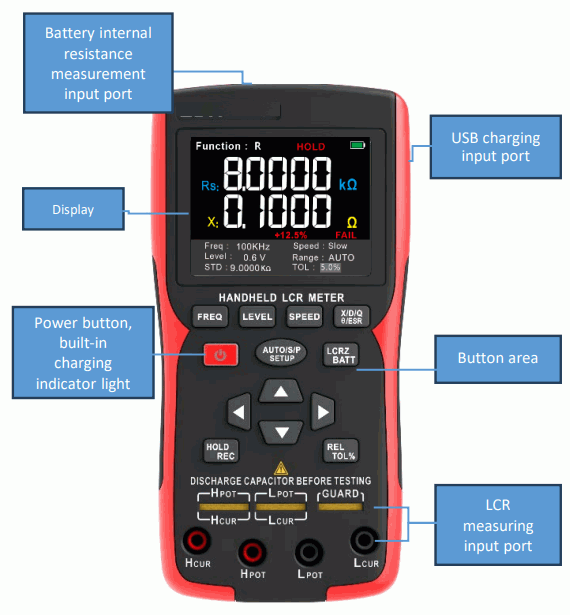
- Power Button. Press this button to turn the instrument on or off.
- Frequency Button. Press this button to select different measurement frequencies.
- Level Button. Press this button to select different measurement levels.
- Measurement Speed button. Press this key to select different measurement speeds.
- Secondary parameter selection Button. Press this button to switch the display of different secondary parameter values.
- Setting Button. Short press this button to switch the measurement equivalent mode, and long press this button to enter the system setting interface.
- Main parameter selection Button. Press this button to switch between different functional measurements.
- Arrow Button. Press the up and down button to move the selection function menu, press the left and right button to modify the setting parameters.
- HOLD/REC Button. Press this button briefly to hold the measurement data, and press and hold it to enter measurement recording mode and toggle the connection with the host computer.
- REL/TOL Button. Press this button briefly to enter tolerance measurement mode, and press and hold it to reset the main parameter value to zero.
Display
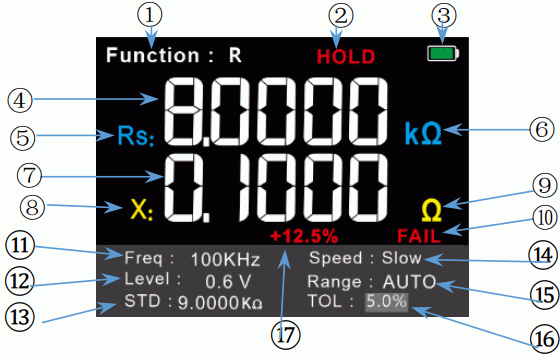
- 1. Measuring function. Display measuring functions: Auto, resistance, capacitance, inductance, impedance, electrolytic capacitance, battery internal resistance.
- 2. HOLD. Indicates that it is currently in data save mode.
- 3. Battery symbol. Displays the current battery level status.
- 4. Master display value. Display the main parameter measurements.
- 5. Functional symbols. Displays the symbols for the current measurement function, where s represents series equivalent and p represents parallel equivalent.
- 6. Unit symbol. Displays the unit symbol of the current main parameter measurement.
- 7. Secondary display values. Display sub-parameter measurements.
- 8. Sub-parameters. Displays the secondary parameter function symbol for the current measurement.
- 9. Unit symbol. The unit symbol that displays the value of the subparameter of the current measurement.
- 10. Results. Display measurement results in tolerance mode judgement, PASS or FAIL.
- 11. Frequency. Display the set measurement frequency.
- 12. Levels. Display the set measurement level.
- 13. Nominal value. Show the nominal value set in tolerance mode.
- 14. Speed. Display the set measurement speed.
- 15. Measuring Range. Displays the set resistance test range.
- 16. Tolerance. Shows the allowable error range set in tolerance mode.
- 17. Tolerance values. Displays the percentage of the margin of error between the measured physical value and the nominal value.